Blog Filter

Your Squarespace blog. Filtered, sorted, and laid out exactly how your clients need it.

Most Squarespace blogs are a single scrolling list with no way to filter, search, or sort. For clients with growing archives — courses, articles, case studies, news — that's a problem. Visitors give up. Content gets buried.

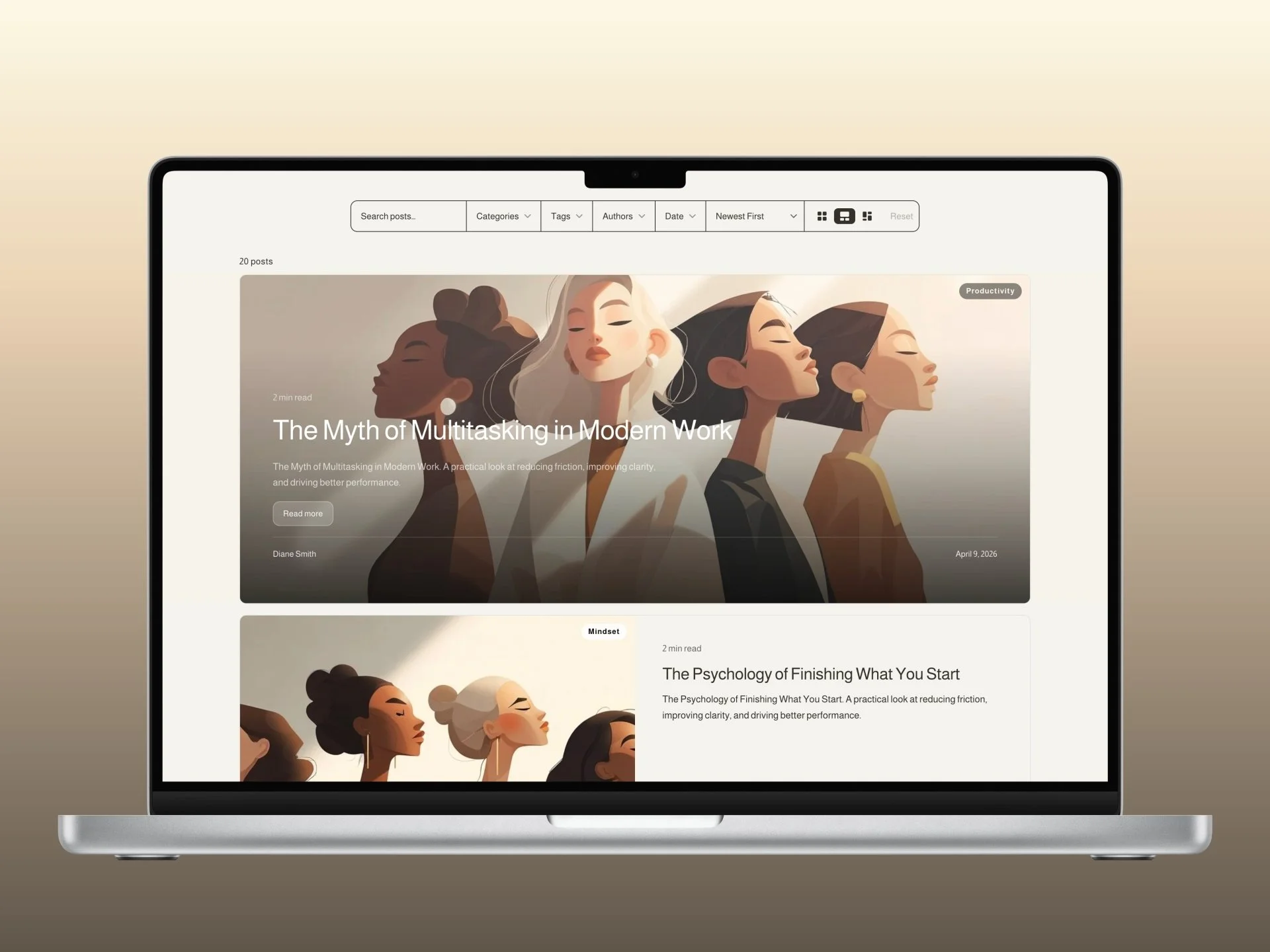
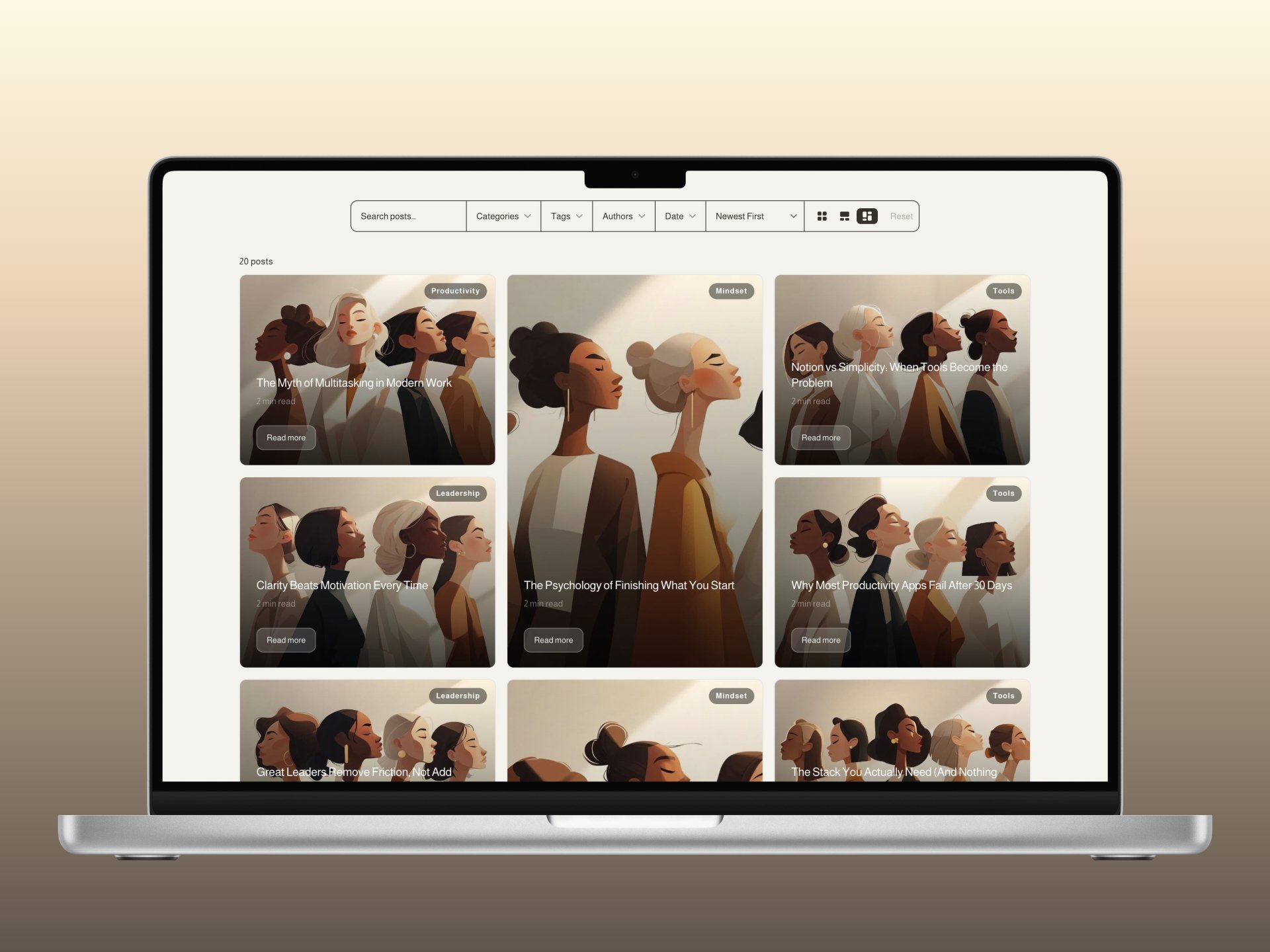
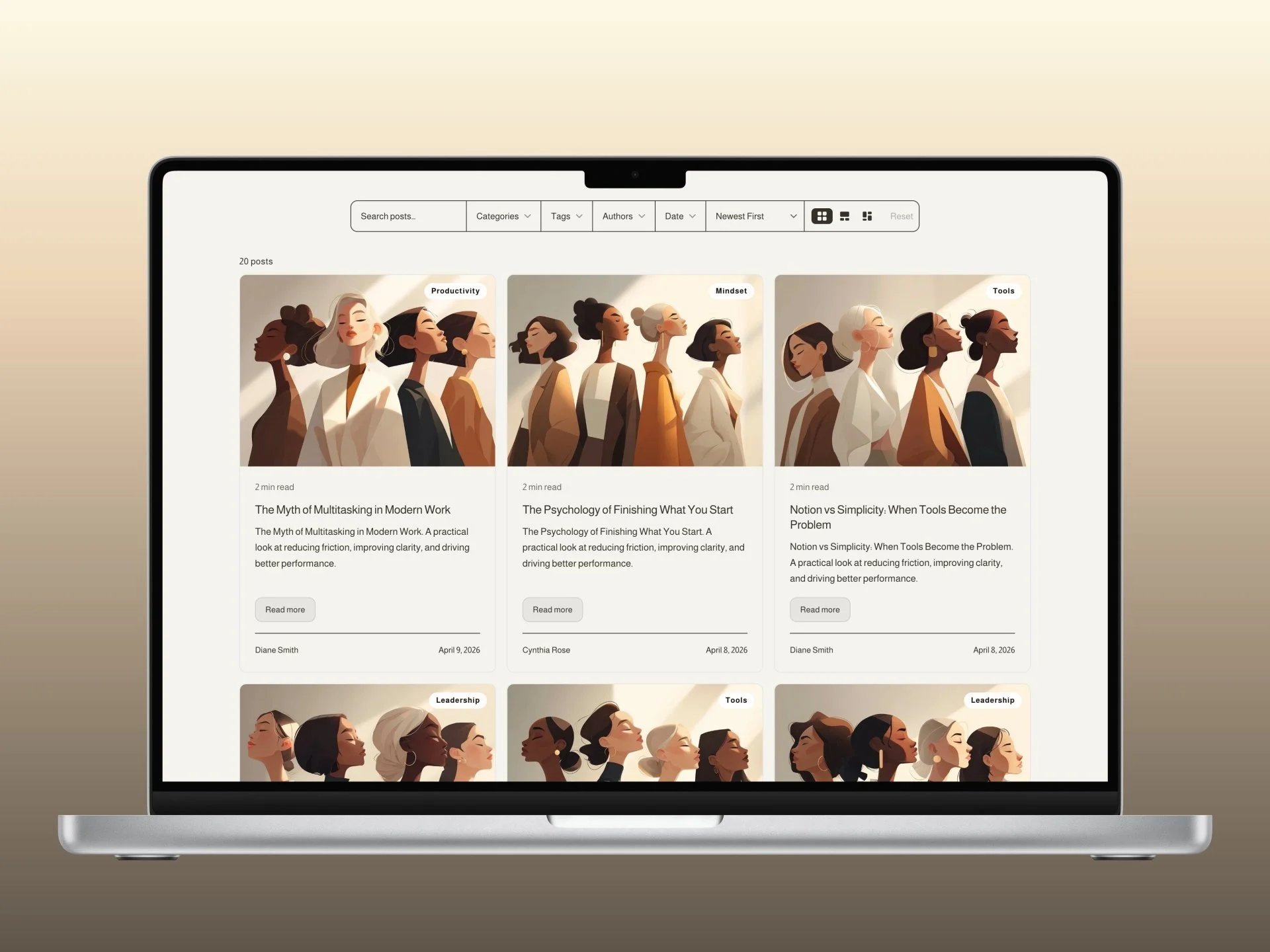
The Blog Filter replaces the native listing with three fully configurable layouts: Grid, Newsroom, and Mosaic. Add instant search, filtering by category, tag, author, and year, and a load mode that suits the content. Everything reads your site's button styles automatically, so it fits any template without touching CSS.

Setup is two code blocks in Page Header Code Injection. The configurator handles the rest.

Squarespace Blog Filter
$60.00

Your Squarespace blog. Filtered, sorted, and laid out exactly how your clients need it.

Most Squarespace blogs are a single scrolling list with no way to filter, search, or sort. For clients with growing archives — courses, articles, case studies, news — that's a problem. Visitors give up. Content gets buried. This plugin solves it.

Three Views

  • Newsroom

  • Mosaic

  • Grid

One Powerful Filter

Squarespace Blog Filter. Customizations
Squarespace Site Styles
The plugin reads your site's design automatically.
The Blog Filter inherits your Squarespace button shape, colors, and border radius directly. applied across the filter bar, dropdowns, cards, and layout toggle. Square buttons? Everything goes square. Pill? The bar goes pill, cards stay tasteful. Your site's look, zero extra work.
Auto from Site Styles

Three ways to display your blog.

01.1
Default layout
Set the layout visitors see when they first land on the page. Choose from Grid, Newsroom, or Mosaic. If the layout toggle is enabled, visitors can switch between all three themselves.
Grid · Newsroom · Mosaic
Grid
Equal cards
Newsroom
Editorial
Mosaic
Immersive
01.2
Show layout toggle
Adds the three layout icons to the filter bar so visitors can switch between Grid, Newsroom, and Mosaic in real time. Their preference is remembered per session. Turn this off to lock the layout.
01.3
Grid columns
When Grid layout is active, choose 2 or 3 columns on desktop. Collapses to a single column on mobile automatically. Only applies when the grid layout is selected.
2 · 3 columns
01.4
Newsroom columns
Controls how many columns posts #3 and beyond use in the Newsroom layout. The hero (post #1) and split card (post #2) always span the full width regardless. Choose 2 (default) for an editorial feel, or 3 for denser coverage.
2 · 3 columns
01.5
Card gap
The spacing between cards in pixels. Applies to all three layouts. Set to 0 for a seamless flush grid, or up to 64px for an airy editorial feel.
01.6
Show hero post
In Grid and Mosaic layouts, pin the first post as a full-width overlay hero above the grid. Always visible on desktop, hidden on mobile. Not needed in Newsroom, which has a built-in hero.
Hero post example

The editorial layout, tuned to your content.

02.1
Hero height
The full-bleed first post spans the entire width. Set its height in pixels, typically 400–600px. A gradient overlay keeps the title readable over any photography.
02.2
Split card height & ratio
The second post renders as a side-by-side image and text card. Set its height and the image-to-text column ratio (40/60, 50/50, 60/40, or 70/30) to match your content proportions.
40/60 · 50/50 · 60/40 · 70/30
02.3
Image overlay opacity
Controls the gradient over images on the Newsroom hero and all Mosaic cards. 0 means no overlay, image only. 100 is fully black. The default of 75 keeps text legible while preserving image detail.
0 – 100%

Every card element, under your control.

03.1
Card height
The minimum height of standard cards. Posts 3 and beyond in Newsroom, and all cards in Grid and Mosaic. Tall cards create an editorial feel; shorter cards show more posts above the fold.
03.2
Image height
The image area at the top of each card. 220px gives a landscape ratio; 300px gives a 3:2 feel. Adjust to suit your photography or thumbnail format.
03.3
Hover zoom
The image scales subtly when visitors hover over a card. Set to 1 to disable, 1.02 for a gentle pull, up to 1.1 for a more dramatic zoom. Respects user's reduced-motion preference.
03.4
Excerpt lines
The maximum number of lines of excerpt text before it truncates. 2–4 lines keeps cards uniform height. More lines surface more content, fewer lines keep cards lean.
03.5
Reading speed
Words per minute used to calculate the "X min read" estimate shown on each card. Defaults to 200, the average adult reading speed. Adjust to match your audience.
03.6
Category pill
A frosted pill badge in the top-right of the card image showing the first category. Clean on any photo. White on dark images, dark on light. Toggle it off for a cleaner look.
03.7
Show / hide card elements
Independently toggle every piece of metadata on each card. Turn off what doesn't apply to your blog. Some blogs skip authors, others skip read time.
Excerpt
Date
Author
Category
Read Time
Post Count

Background, border, and theme integration.

04.1
Follow section theme
When enabled, card backgrounds automatically inherit the background color of the Squarespace section they sit in. white sections get white cards, dark sections get dark cards. No manual color entry.
Auto from Section
04.2
Custom card background
When theme inheritance is off, set a specific card background color. Useful when you want cards to stand out from the section background or maintain a specific brand color.
04.3
Border width
A 1px hairline border gives cards definition without weight. Set to 0 for a borderless look, or up to 4px for a more graphic, bold frame. Works on all three layouts.
04.4
Border color
Defaults to your site's existing border color. automatically consistent with Squarespace form fields and dividers. Override here for a specific tint if needed.

Show only the filters your visitors need.

05.1
Filter bar alignment
Controls the width and position of the filter bar. Left, Center (default), or Right shrinks the bar to fit its content and aligns it accordingly. Best when you have just a few filters. Full stretches across the container, with the search field expanding to push all dropdowns to the right edge.
Left · Center · Right · Full
05.2
Search minimum width
When the bar alignment is Left, Center, or Right, the search field has a guaranteed minimum width in pixels so it never collapses too narrow. Raise it for longer placeholder text; lower it for a more compact bar with many dropdowns visible.
Filter bar. live preview
All Categories
All Tags
Newest First
Reset
05.3
Filter visibility. 7 options
Independently show or hide every element in the filter bar. Turn off what doesn't apply to your blog. Simpler is often better.
Search
Categories
Tags
Authors
Years
Sort Dropdown
Post Count
05.4
Search. post body
By default search covers titles and excerpts. Enable body search to also scan the full post content. Supports comma-separated terms: "boats, fishing" matches posts containing either word.
05.5
Filter logic
OR shows posts matching any active filter, broadening results. AND narrows results to posts matching all active filters simultaneously. Per-site control based on your content strategy.
OR · AND
05.6
Active filter chips
Pill tags appear above the results showing which filters are active, e.g. Category: Design ×. Visitors click × to remove individual filters without clearing everything. Toggle off for a cleaner look.
05.7
Filter counts
Shows the number of matching posts next to each dropdown option. e.g. "Fishing (4)". Useful for large blogs; turn off when counts would show everything is equal.
05.8
URL parameters
Active filters are written to the page URL. e.g. /blog?category=Design&tag=Tips. Visitors can share or bookmark a filtered view, and the browser back button navigates filter states correctly.
05.9
Search placeholder & reset label
The placeholder text inside the search field and the label on the reset button. Translate or rephrase for any language or brand voice.

Surface your most important topics first.

06.1
Custom category order
By default, categories appear alphabetically. Provide a comma-separated list of exact category names in the order you want them. only those names will appear in the dropdown. Great for surfacing your most important topics first.
06.2
Custom tag order
Same control for tags. define the exact order they appear in the dropdown. Names must match your Squarespace tags precisely (case-sensitive). Anything not listed falls to the end alphabetically.

How more posts are revealed.

07.1
Infinite scroll
Posts load automatically as visitors scroll down. no button required. New batches appear seamlessly, keeping readers engaged without interruption. The default and recommended mode for editorial blogs.
Default
07.2
Button. lazy loading
A "Load more" button appears after the first batch. Visitors explicitly choose to load the next set of posts. Better for performance-conscious sites or when you want to control the reading pace. The button label is fully configurable.
07.3
Posts per batch
How many posts render on first load and on each subsequent load. 12 is a reliable default. enough to fill above the fold on most screens. Raise it for dense archives, lower it for performance on image-heavy blogs.
07.4
Smart session cache
All posts are cached after the first fetch. On every subsequent visit the plugin checks the collection's updatedOn timestamp. if nothing has changed, posts render instantly from cache. If you've published or edited anything, the cache is discarded and fresh data is fetched automatically. No stale content, no manual clearing needed.
Always on

A call to action on every card.

08.1
CTA button label
A frosted-glass pill button appears on every card. Grid, Newsroom, and Mosaic. The default label is "Read more". Change it to anything: "Continue", "View post", "Discover", or any phrase in any language.
Fully configurable text
Read more
Continue
View post
08.2
Follow site button style
When enabled (default), the CTA pill adapts its border radius to match your Squarespace button shape. square, rounded, or pill. Padding is capped so the button stays compact inside each card regardless of how large your site buttons are elsewhere.
Square · Rounded · Pill
08.3
Consistent alignment
The CTA button is always pinned exactly 16px above the footer line on every card. regardless of title or excerpt length. Every card has the button at the same vertical position above the author and date row.

Dates that speak your visitors' language.

09.1
Date order
Choose Month first (US. June 10, 2026) or Day first (International. 10 June 2026). A single toggle flips all date displays across the plugin, including live style previews in the configurator.
MDY · DMY
09.2
Date style
Six ready-to-use formats: Full + Day (Wednesday, June 10, 2026), Short + Day (Wed, Jun 10, 2026), Full (June 10, 2026), Short (Jun 10, 2026), Numeric (06/10/2026), and Minimal (June 10). Each format adapts automatically to your chosen date order.
6 presets
09.3
Custom format tokens
Need something specific? Set dateDisplayFormat: "custom" and use moment.js-style tokens in dateDisplayCustomFormat. Available tokens include D, DD, MMM, MMMM, YYYY, ddd, dddd, and more. giving you any format for any locale.
Full token parser
09.4
Source URL redirect
If a blog post has "Link Post Title to Source URL" enabled in Squarespace. typically used to redirect posts to product pages or external URLs. the plugin reads that setting per post and links the card to the correct destination automatically. Posts without the toggle link to their own blog post page.
Per-post, automatic

Every word is yours to set.

10.0
Full localisation support
Every piece of visible text in the plugin — dropdown defaults, sort options, post count, filter labels, buttons, and messages — can be overridden in the config block. Set it once and the entire UI speaks your language. Full Unicode support means accents, special characters, and emoji all work correctly everywhere.
Full Unicode support
10.1
Filter dropdown defaults
The default label shown in each dropdown when nothing is selected. "All Categories", "All Tags", "All Authors", and "All Years" by default. Translate or rewrite all four independently — "Toutes les catégories", "Alle Kategorien", or whatever fits your site's language and voice.
10.2
Multi-select label
When a visitor picks more than one option in a dropdown, the header shows "3 selected". The word "selected" is configurable — localise it to "ausgewählt", "sélectionnés", or any equivalent in your language.
10.3
Sort dropdown options
"Newest First", "Oldest First", and "Read Time" are all configurable. Translate them or rewrite them entirely to match your tone — "Most Recent", "Chronological", or anything else.
10.4
Post count
The post count above the grid shows "Showing 5 of 12 posts" or "12 posts". Every word in that string is individually configurable: "Showing", "of", "post" (singular), and "posts" (plural) — so it reads naturally in any language.
10.5
Search placeholder
"Search posts…" by default. Translate or rewrite to match your voice — "Find an article", "Explorer les sujets", whatever fits.
10.6
Reset button
"Reset" by default. Clears all active filters at once. Translate or adjust to match the rest of your UI copy.
10.7
Load more button
Only shown when Load More Mode is set to button. "Load more" by default. Change to "Show more posts", "Continuer", or any phrase that suits your brand.
10.8
Loading message
"Loading posts…" shown while the plugin fetches your blog on first load. Translate or rephrase for any language.
10.9
No results message
"No posts match your filters." shown when active filters return zero results. Translate or personalise it to encourage visitors to try different options.
10.10
Card CTA label
"Read more" by default — the button on every card. Change to "Continue", "View post", "Lire la suite", or any phrase in any language.

Questions we get asked a lot.

Yes. The Blog Filter is built specifically for Squarespace 7.1 Fluid Engine and is tested across templates. It reads your site's existing button styles, colors, and border radius automatically so it fits any theme without custom CSS.
No. The engine script is minified and served from a global CDN. Posts are cached after the first fetch so returning visitors see instant renders. On first load there is a brief spinner while posts are fetched from the Squarespace API, but subsequent visits within the same session skip that entirely.
Yes. The plugin fetches all posts in paginated batches from the Squarespace API and displays them in configurable batch sizes. Infinite scroll and lazy-load button modes both keep the page responsive regardless of how large your archive is. Sites with 200+ posts work without issues.
No. The configurator handles all the setup. You set your options visually, click Copy, and paste two code blocks into Squarespace's Page Header Code Injection. That's it. If you ever want to change a setting, open the configurator again and repeat the same process.
Yes. The plugin uses a smart cache that checks a freshness timestamp on every page load. The moment you publish, edit, or update any post, the cache invalidates and the next visitor gets fresh data automatically. No manual clearing needed.
Yes. Each blog page gets its own config block in its own Page Header Code Injection. You can also run two instances on the same page using an array config, each pointed at a different blog URL.
Yes. Categories, tags, authors, and publish dates are all read directly from your Squarespace posts. There is nothing extra to configure. The filter dropdowns populate automatically based on whatever is already assigned to your posts.
The plugin requires JavaScript. If it's disabled, the visitor sees the native Squarespace blog listing instead. A built-in failsafe also restores the native listing if the plugin encounters any error loading, so your blog content is always accessible.
Yes. Every piece of UI copy is configurable in the config block. Search placeholder, reset button, load more button, no-results message, card CTA, dropdown defaults — all of it. The plugin also supports full Unicode so accents, special characters, and emoji work everywhere.
The plugin hides the native Squarespace blog listing and renders its own cards, but the underlying blog pages remain fully indexed by search engines. Individual post URLs, metadata, and Squarespace's own SEO settings are all unchanged. The filter is client-side only and does not affect how search engines crawl or index your content.